

Skip to content
Camzify
Detection Data, Broken Down

Video surveillance analytics & reporting

Camzify analytics provides detection breakdowns by feature, object type, site, and severity. Attribute trends track people vs vehicles with distributions, and the detection-confidence split shows High, Medium, and Low confidence levels across all alerts. Every AI feature also carries its own 7-day event trend against the prior week, plus how many of its licensed camera instances are actively running — so a feature quietly nearing its limit shows up before it becomes a blind spot. All data is exportable.
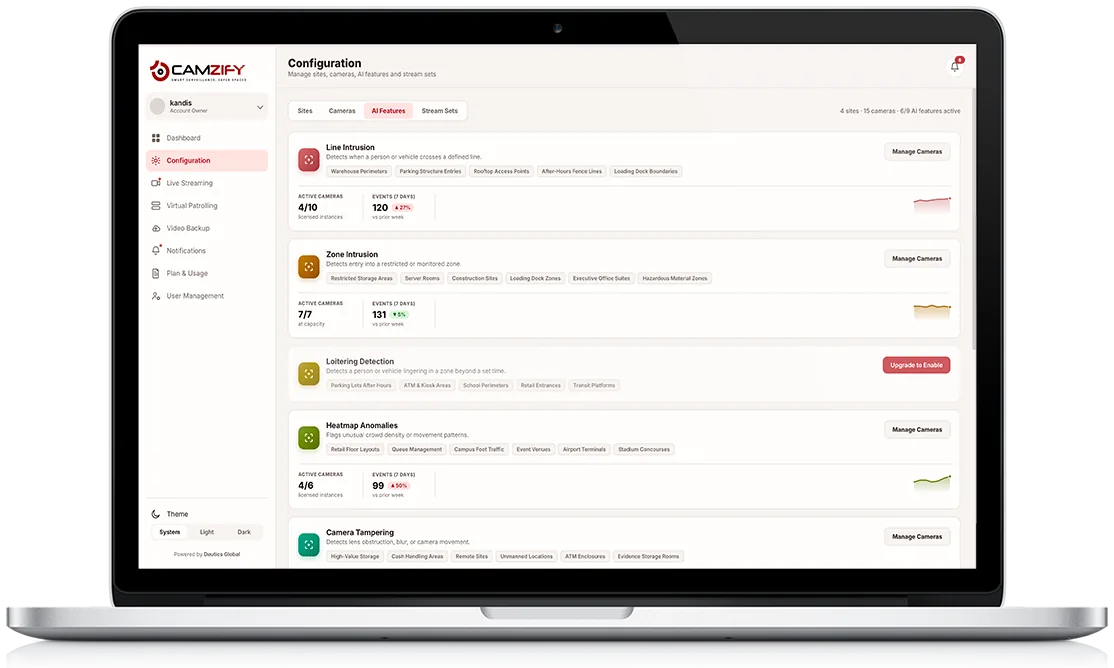
A laptop showing the Camzify Configuration AI Features screen with per-feature active-camera counts and 7-day event trends for Line Intrusion, Zone Intrusion, Heatmap Anomalies, and Camera Tampering
Analytics & Reporting · 7-Day Trend
vs. prior week
692
Events · 7 Days
2
Features At Capacity
4
With Licensed Headroom
Detection Events By Feature
Camera Tampering
2280%15/15 · at capacity
Zone Intrusion
1315%7/7 · at capacity
Line Intrusion
12027%4/10 · licensed
Heatmap Anomalies
9950%4/6 · licensed
Fire & Smoke
679%2/3 · licensed
PPE Violations
4713%3/6 · licensed
In practice

What the analytics break down

Per-feature trend visibility

Every AI feature shows its own 7-day event count and week-over-week percentage change, not just a combined total.

Capacity and licensing at a glance

Active camera instances against licensed or capacity limits per feature, so a feature nearing its limit is visible before it becomes a blind spot.

Exportable reports

Pull the same breakdown out whenever you need it for a shift handoff, a client update, or an audit trail.

Site and severity breakdowns

Slice detection activity by site or by severity to see where activity is concentrated, not just how much of it there is.

Why It Matters

Trend context, not just a total

A raw event count doesn't tell you whether a feature is behaving normally or drifting. Camera Tampering sitting at 228 events with a flat week-over-week trend reads very differently from Heatmap Anomalies jumping 50%, one is steady state, the other is worth a closer look, and the 7-day comparison is what makes that visible at a glance instead of buried in a raw log.

Capacity utilization matters just as much. A feature running at 7/7 or 15/15 active instances has no room left to cover another camera without licensing more, catching that before a rollout stalls is easier than discovering it mid-deployment. This module integrates with virtual patrolling, so detection trends, patrol results, and platform status all feed into the same operational picture.

Capacity Snapshot
Camera Tampering
15/15 · at capacity
Zone Intrusion
7/7 · at capacity
Line Intrusion
4/10 · licensed
Heatmap Anomalies
4/6 · licensed
PPE Violations
3/6 · licensed
Fire & Smoke
2/3 · licensed
FAQ

Frequently asked questions

It means every licensed camera instance for that feature is actively running, active instances equal the licensed total, like Zone Intrusion at 7/7 or Camera Tampering at 15/15. Adding coverage on more cameras for that feature means licensing additional instances.

The trend shown is the current rolling 7-day event count compared against the 7 days before it, so the percentage moves as each day rolls out of the window and a new day rolls in.

Every breakdown on this screen is exportable on demand, pull it whenever you need it for a shift handoff, a client update, or an audit trail, rather than waiting on a fixed delivery schedule.

Yes. Detection breakdowns can be scoped down to a single site, in addition to slicing by feature, object type, and severity, so a multi-site account isn't stuck reading one combined total.

The live breakdown here is built around a rolling 7-day window, which is the fastest way to catch a feature drifting toward, or already at, capacity. For a longer comparison, export the data for each period and compare them directly.

Ready to patrol your site 24/7?

Book a 15-minute demo and see a live patrol run on your own cameras.

This site is being updated

We are rebuilding pages as you read this, so an image, a link or a section may look unfinished for a while. The product itself is unaffected. If something important is broken, tell us at the contact page and we will fix it.