

Security patrol reports
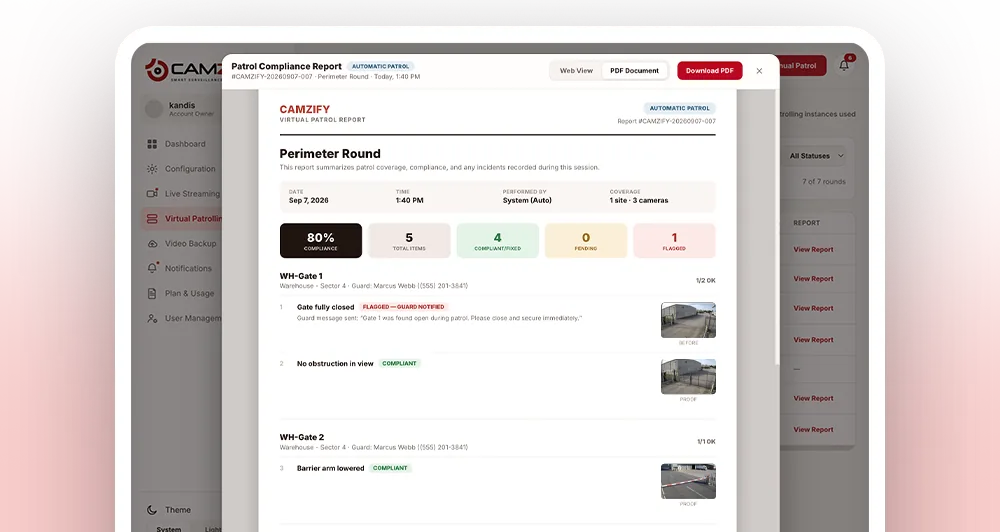
A security patrol report is the PDF document generated after every virtual patrol round. It contains the patrol sequence name, date and time, every camera checked, each checklist item with its compliance status, the camera snapshot that item was judged against, the guard notified on any failure, and an overall compliance percentage. Reports are emailed automatically and stored in the patrol log, where each round opens as a web report or a PDF.
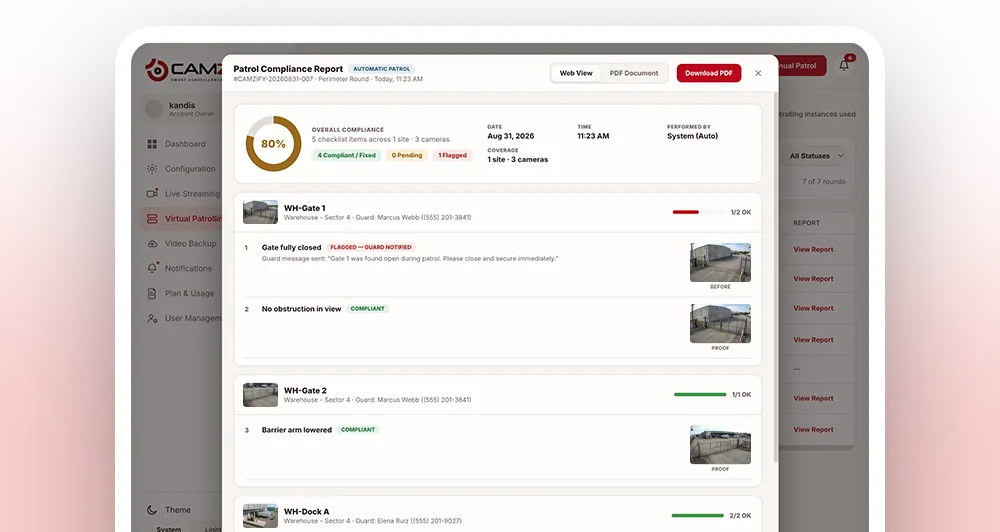
What the report includes
- Patrol sequence name and site
- Date, start time, and end time
- Each camera in the sequence with its checklist results
- Compliant and Not Compliant status per item
- The camera snapshot each item was judged against, which can be zoomed into
- Before and after frames on any item that was fixed during the round
- On automated rounds: a written description of the scene, the objects detected in it, and the reasoning behind each answer
- On automated rounds: a safety and security risk assessment for every camera, recorded even when nothing is wrong
- Guard notifications sent on failures
- Overall compliance percentage for the round
- Patrol type (Manual or Auto)
- Status: Completed, Flagged, or Overdue
Why reports matter
Insurers ask for proof of patrol coverage. Regulators want timestamped records. Auditors need to verify that checks happened and failures were escalated. The patrol report is the document that answers all three, generated automatically, every round, with zero manual input.
See how a round is run for where each part of the report comes from. Combined with compliance tracking, these reports create a continuous audit trail that proves patrol discipline across every site.
- 01Round reaches its last stop
- 02Every result compiled
- 03Report built with snapshots
- 04Emailed and logged
How a patrol report gets generated
- 01The patrol round reaches its final camera stop, whether manual or run on an automated schedule
- 02Every checklist result from the round is compiled into a single record, each one paired with the snapshot taken at that camera
- 03The record is formatted into a PDF with the sequence name, timestamps, and per-camera results
- 04The report is emailed automatically to configured recipients
- 05The report is stored in the patrol log, openable as a web report or a PDF, linked to that round's compliance percentage
Recipients, retention & export formats
- • Set a distribution list per site, every recipient gets the PDF as soon as a round finishes
- • Reports are retained in the patrol log for later lookup, pull up a specific week, site, or camera on demand
- • Export a single report or a date range together for insurance claims, regulator requests, or internal audits
- • Filter historical reports by status, Completed, Flagged, or Overdue, to spot patterns fast
- 01Set the distribution list
- 02Round finishes
- 03PDF emailed to every recipient
- 04Retained and filterable
Frequently asked questions
Ready to patrol your site 24/7?
Book a 15-minute demo and see a live patrol run on your own cameras.