

AI perimeter security
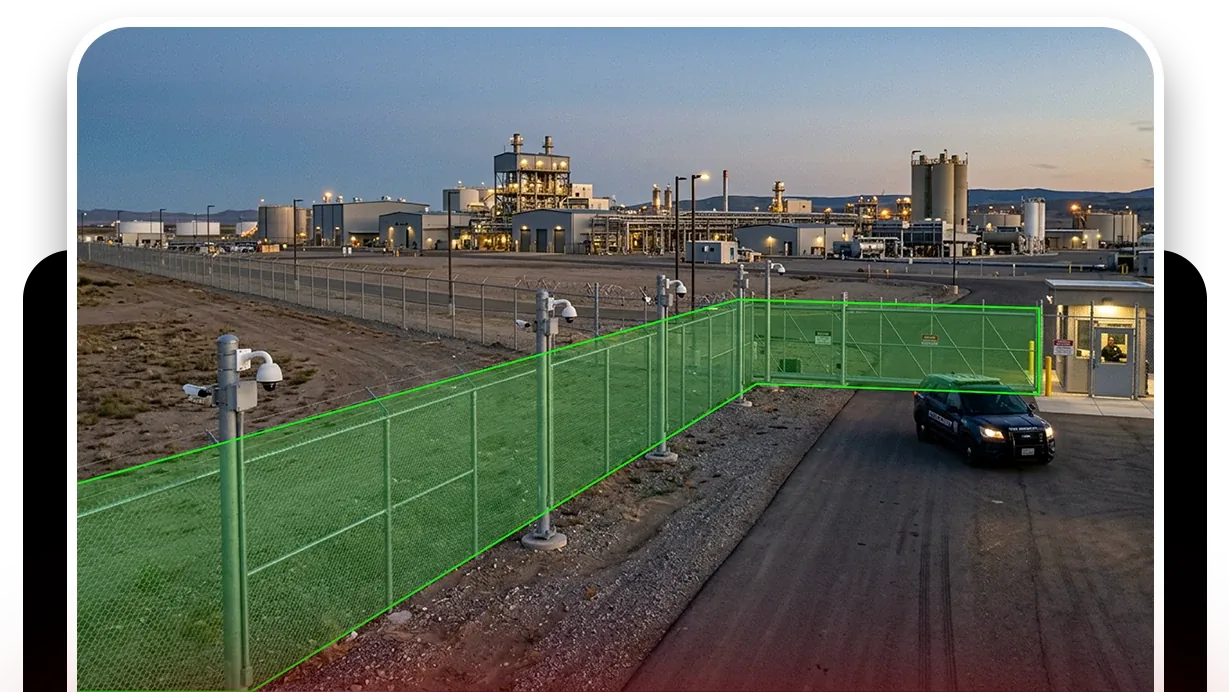
Perimeter security is the detection of, and response to, intrusion at the outer boundary of a site: fence lines, gates, loading areas and open ground. It is the first layer of a physical security program and the one most often left to a camera nobody is watching. Camzify puts two things on those cameras: detections that fire when a tracked person or vehicle crosses a line or enters a zone, and a scheduled patrol round that checks the fence, the gate and the camera itself and records what it found.
- Line and zone intrusion on confirmed tracks
- A fence-line round with a checklist
- Guard messaged on a failed check
A recorded breach is not a detected one
Conventional CCTV records the perimeter and cannot tell a person climbing the fence from a shadow moving across it. The footage exists, and it is reviewed after the loss is discovered, which makes it evidence rather than security. Pixel-based motion alarms try to close that gap and instead fill the inbox with rain, headlights and foliage until somebody turns them off.
A guard watching a wall of perimeter cameras has the opposite problem: hours of nothing, then a few seconds that matter, usually during a shift change or at the end of a long night. The breach that gets missed is rarely the one that was hard to see.
“Dock door left unsecured after delivery — confirm and lock.”
Unacknowledged alerts escalate to the backup contact after the configured window.
Detections for the event, rounds for the record
Line intrusion detection draws a tripwire across the fence line or gate in the camera view, with a direction, and fires when a confirmed object track of a chosen class crosses it. Zone intrusion detection does the same for an area, the yard inside the fence for example, with a notification window per camera so that presence at 3am notifies and presence at 3pm does not. Both operate on a track the system has followed across frames, which is why a swaying branch does not count.
Between those events, a virtual patrol round visits every fence-facing camera on a schedule and checks a list: is the fence line clear, is the gate closed, is the camera view unobstructed. Each answer is recorded with the frame it was judged against. Camera tampering detection covers the case where the camera itself is turned, covered or blinded, which on a perimeter is often the first move; camera health monitoring covers the slow failures.
Line intrusion detection
A directional tripwire on the fence line or gate. Fires on a tracked person or vehicle crossing it.
DetectionZone intrusion detection
An area inside the boundary with a notification window. Presence during it is the event.
DetectionCamera tampering detection
A camera turned, covered or defocused raises an alert before the perimeter goes dark.
DetectionMulti-object tracking
The layer beneath the others: each subject followed across frames so rules fire on a track, not a pixel.
- Fence line clearCompliant
- Gate closed and latchedCompliant
- No person in the yardNot compliant
- Camera view unobstructedPending
A failed item is resolved as Fixed or Pending before the round can close.
What a perimeter round checks
A perimeter sequence is the fence-facing cameras in walking order, with a checklist at each. The items are conditions, not events: the fence line is clear, the gate is closed, nothing is parked against the boundary, the camera sees what it should. A round that passes produces a report that says so, with a snapshot per item, which is the record an insurer or an auditor asks for and a camera alone never produces.
Run it manually when an operator is on shift, or on a schedule through the night with nobody in the loop. Frequency, active hours and active days are yours to set; every 30 minutes on the perimeter overnight is a common shape.
A check found Not Compliant captures a snapshot and messages the guard designated for that camera; on a manual round the operator chooses to send it, on an automated round it goes on its own. The item stays Pending until it is marked Fixed, which captures the after frame, and the report shows both.
What it will not do
It will not see through a camera that cannot see. Fog, heavy rain and a lens pointed at a floodlight degrade the image, and the detections work on the image. It will not identify who crossed the fence; attribute extraction can describe clothing and what they were carrying, and it is not facial recognition. And it will not stop anyone. It tells the right guard, with the snapshot, and the response is theirs.
We do not publish detection rates or alert delivery times, because they depend on your cameras, your lighting and your network. The trust page sets out that policy.
Industries where this applies
Frequently asked questions
Ready to patrol your site 24/7?
Book a 15-minute demo and see a live patrol run on your own cameras.