

Skip to content
Camzify
Centralized Oversight

Multi-site video surveillance

Multi-site management in Camzify provides a single console to oversee cameras, detection alerts, and patrol compliance across all locations. Each site is a separate entity with its own cameras, sequences, and operators, but the parent account has visibility into everything. This account runs 4 sites with 15 cameras configured and 6 of 9 AI features active, and every dashboard, live view, and notification feed can be filtered by site.
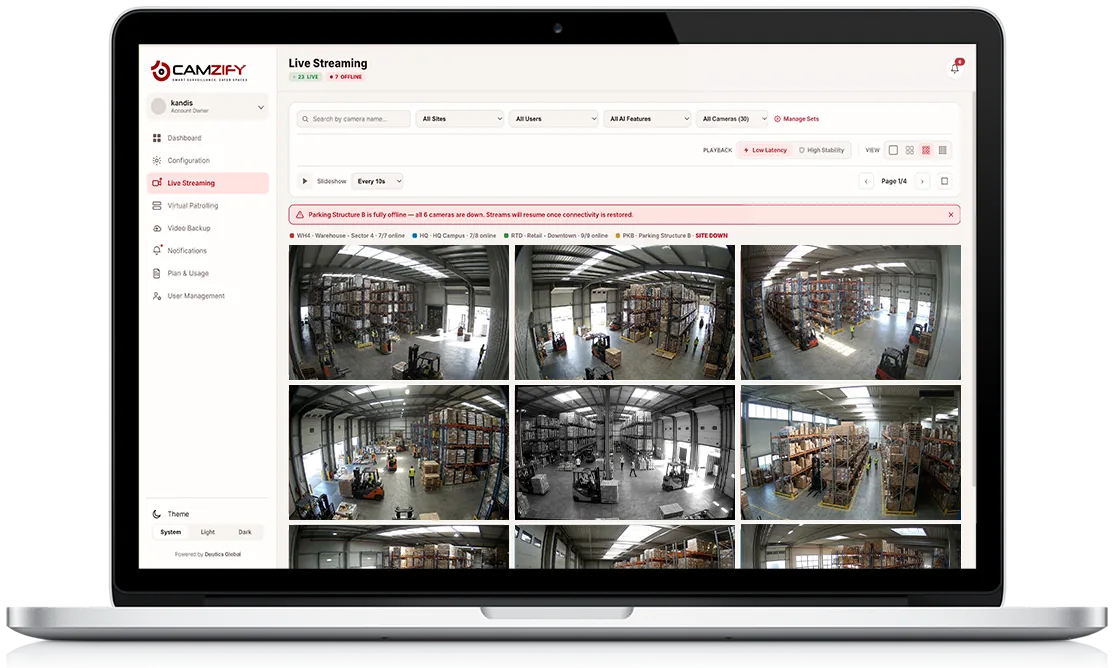
A laptop showing the Camzify Live Streaming grid with camera feeds grouped across four sites — Warehouse, HQ Campus, Retail Downtown, and Parking Structure B
Multi-Site Overview
6/9 AI Features Active
4Sites
15Cameras Configured
Warehouse - Sector 45/5
4820 Distribution Way, Bay 4
7-Day Events
80-21%
HQ Campus4/4
100 Corporate Pkwy
7-Day Events
101+23%
Retail - Downtown3/3
212 Main St
7-Day Events
350%
Parking Structure B2/3
88 Commerce Ave
7-Day Events
85-17%
In practice

How sites are managed together

Centralized multi-site oversight

One console rolls up cameras, events, and compliance from every site, 4 sites and 15 cameras on this account, all visible from a single view.

Per-site independent configuration

Each site keeps its own cameras, patrol sequences, and operators, configured separately from every other location on the account.

Account-wide AI feature rollout tracking

6 of 9 AI features are active account-wide, with visibility into which sites are running which detection models.

Distributed camera and storage allocation

Cameras and storage are allocated from the same account-wide pool, distributed across sites based on where they're actually needed.

Adding A Site

Independent setup, one dashboard

A new site is added and configured on its own, its own address, its own cameras, its own patrol sequences and AI-feature selection, without touching how any existing site is set up. Parking Structure B, for example, runs 2 of 3 cameras online independently of how HQ Campus or Retail - Downtown are configured.

Once configured, the new site rolls straight into the same account-wide dashboard, event feed, and notifications as every other location, no separate login, no separate report to pull. Camera counts, 7-day event trends, and AI feature coverage all show up alongside the sites already on the account.

Account Snapshot
Sites
4 locations, each independently configured
Cameras
15 configured across all sites
AI Features
6 of 9 active account-wide
HQ Campus
4/4 cameras online · 101 events, up 23%
FAQ

Frequently asked questions

Adding a site itself doesn't consume anything from your plan — the license pool tracked on Plan & Usage is instance- and storage-based, not site-based. Cameras and AI-feature instances at the new site draw from the same account-wide pool, so what you need is enough available instances, not a plan upgrade just to add a location.

Yes. Across this account, 6 of 9 AI features are active account-wide, but which of those run at any given site is configured independently, a warehouse might run Zone Intrusion and Camera Tampering while a retail site runs Heatmaps instead, based on what each location actually needs.

Both views exist. Each site keeps its own configuration, cameras, and event history as a distinct record, but the Dashboard and Analytics & Reporting screens can combine every site into one account-wide picture, so a compliance report can be pulled per location or aggregated across all of them depending on what's needed.

Yes, site-level access works alongside permission groups, so a sub-user can be granted visibility into specific sites only, rather than the full set. A guard assigned to Retail - Downtown, for instance, doesn't need to see Warehouse - Sector 4 to do their job, and their access can reflect that.

The affected site is flagged distinctly rather than blended into the account-wide numbers, its camera-online ratio drops and it shows up clearly in the site list, while the other sites continue reporting normally. See the Live Streaming and Dashboard pages for how a full site outage is surfaced in those views specifically.

Ready to patrol your site 24/7?

Book a 15-minute demo and see a live patrol run on your own cameras.

This site is being updated

We are rebuilding pages as you read this, so an image, a link or a section may look unfinished for a while. The product itself is unaffected. If something important is broken, tell us at the contact page and we will fix it.