

Skip to content
Camzify
Role-Based Access Control

Permission groups

Permission groups in Camzify define a per-module access matrix: which of the seven platform pages a role can reach, and View, Create, Edit, and Delete rights across the ten AI-feature instance types. Four ready-made roles, Site Admin, Guard, Auditor, and Surveillance Manager — cover the operational patterns most deployments need. Combined with site-level access control, this creates fine-grained security appropriate for multi-site enterprise deployments.
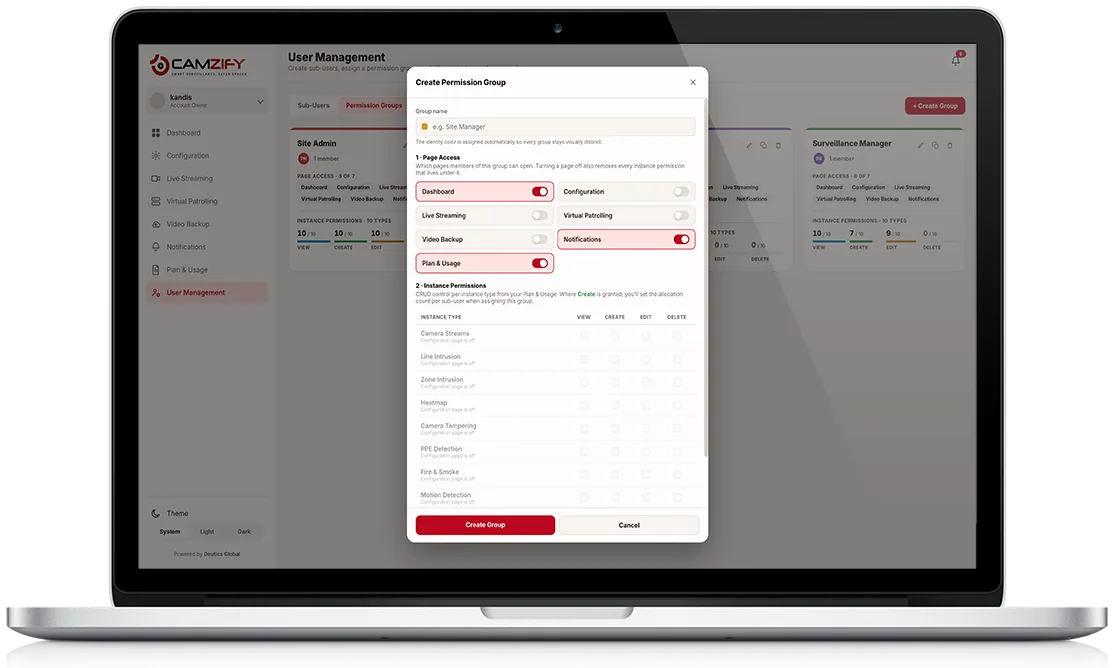
A laptop showing the Camzify Create Permission Group screen with page-access toggles and a View/Create/Edit/Delete instance permissions matrix
User Management · Permission Groups
4 Groups
Site Admin1 member
Page Access6/7
Dashboard, Configuration, Live Streaming, Virtual Patrolling, Video Backup, Notifications
View
10/10
Create
10/10
Edit
10/10
Delete
8/10
Guard1 member
Page Access4/7
Dashboard, Live Streaming, Virtual Patrolling, Notifications
View
1/10
Create
0/10
Edit
0/10
Delete
0/10
Auditor1 member
Page Access7/7
Dashboard, Configuration, Live Streaming, Virtual Patrolling, Video Backup, Notifications, Plan & Usage
View
10/10
Create
0/10
Edit
0/10
Delete
0/10
Surveillance Manager1 member
Page Access6/7
Dashboard, Configuration, Live Streaming, Virtual Patrolling, Video Backup, Notifications
View
10/10
Create
7/10
Edit
9/10
Delete
0/10
In practice

How a permission group is built

Granular page access

Each role reaches a defined subset of the 7 platform pages. Guard sees 4, Auditor sees all 7. Nothing is all-or-nothing.

View / Create / Edit / Delete

Instance permissions are tracked separately across all 10 AI-feature types, so read access and write access never have to travel together.

Four ready-made role templates

Site Admin, Guard, Auditor, and Surveillance Manager map to real operational roles out of the box. Assign and go.

Applies the moment a role is assigned

Access changes take effect immediately. There is no separate propagation step and no cached permissions to clear.

Two Roles, Two Philosophies

Guard vs. Auditor, in practice

Guard and Auditor sit at opposite ends of the same access model. A Guard reaches only 4 of the 7 pages, Dashboard, Live Streaming, Virtual Patrolling, and Notifications, the pages needed to watch cameras and respond in the moment. Instance permissions are almost nonexistent: View on just 1 of 10 instance types, and zero Create, Edit, or Delete rights anywhere.

An Auditor is the inverse. Page access is complete: all 7 pages, including Configuration and Plan & Usage, which no other non-admin role reaches. Instance permissions are View on all 10 types, and zero write access anywhere. One role is built to act with minimal visibility; the other is built to see everything and change nothing.

Access Model
Guard
4/7 pages · View 1/10 · no write rights
Auditor
7/7 pages · View 10/10 · no write rights
Site Admin
6/7 pages · full read/write, Delete 8/10
Surveillance Manager
6/7 pages · full read/write, Delete 0/10
FAQ

Frequently asked questions

A permission group carries both. Page-level access decides which pages a user can open at all. CRUD permissions decide what they can do to each resource, such as sites, cameras and AI features, at the level of create, read, update and delete. The two combine into the single group you assign to a user.

They go with it. Turning off a page removes the CRUD permissions for that page too, so there is no state where a user holds edit rights over something they cannot reach. That prevents the most common misconfiguration in role-based access: rights that survive on paper after the route to them has been closed.

The four built-in groups, Site Admin, Guard, Auditor and Surveillance Manager, cover the common operational patterns out of the box, and each can be assigned freely to as many users as needed. For access needs outside those four templates, your account team can help scope a custom group to the exact page and instance permissions your deployment requires.

A user's effective access always reflects their group's current configuration, not a snapshot from when they were assigned. If Auditor's page access were changed, every user in the Auditor group would see that change take effect immediately on their next page load, there's no per-user override to reconcile.

They're independent and both apply. Page access controls which sections a user can navigate to at all. A Guard, for instance, has no route into Configuration or Plan & Usage. Instance permissions then control what they can do with the AI-feature instances on the pages they can reach, which is why a Guard can open Live Streaming but still can't create or edit anything there.

No. Each user is assigned exactly one permission group at a time, which keeps the effective access for any given account unambiguous. Moving a user to a different group replaces their previous access rather than adding to it.

View rights let a user see an existing instance and its data, meaning footage, detection events and configuration, without being able to change anything. Create rights let a user stand up a new instance of that AI feature type. A group can have full view access with zero create rights, which is exactly the Auditor pattern: see everything, change nothing.

Ready to patrol your site 24/7?

Book a 15-minute demo and see a live patrol run on your own cameras.

This site is being updated

We are rebuilding pages as you read this, so an image, a link or a section may look unfinished for a while. The product itself is unaffected. If something important is broken, tell us at the contact page and we will fix it.